 UCDetector
Start
About
UCDetector (Unnecessary Code Detector - pronounced "You See Detector") is a eclipse PlugIn tool to find unnecessary (dead) public java code. For example public classes, methods or fields which have no references. UCDetector creates markers for the following problems, which appear in the eclipse problem view:- Unnecessary (dead) code
- Code where the visibility could be changed to protected, default or private
- Methods or fields, which can be final
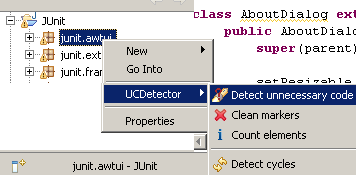
If you can't see the pop menu above, read FAQ
Get UCDetector
UCDetector needs Eclipse >= 3.4 and java >= 5.0.(For older versions: Eclipse 3.2, RAD, Eclipse 3.3 )
Download:
- Download org.ucdetector_x.y.z.jar
- Put org.ucdetector_x.y.z.jar into
ECLIPSE_HOME/dropinsdirectory - Restart Eclipse
http://ucdetector.sourceforge.net/update
Quick start
Instead of clicking Shift+Ctrl+G (search references in workspace) all the time, follow the next steps:- In the package explorer right click on one ore more projects, packages or classes
- Select the context menu: UCDetector/detect unnecessary code

- Check warnings in java editor and Problems View


- Use the menu "Group By/Type" in Problems View
- Change code carefully. Use QuickFixes (right click on markers)
- Change preference "Detect code with max number of references" from 0 to 1, run UCDetector again
- Repeat step 1. to 5.
Really want to change code?
The problems found by UCDetector, are only suggestions. Before changing code, you should really know what you are doing! If UCDetector tells you, that there are no references your code still may be used by:- Reflection
- Frameworks like Spring, Hibernate or Eclipse which declare dependencies in property files, xml files (extension-points) ...
- Third party code, which is using your API
- Jars in your workspace
- To be continued...
Change visibility may cause problems with inheritance, reflection, instantiation...
It's good idea to do a full text search in workspace for the piece of code, you want to change.
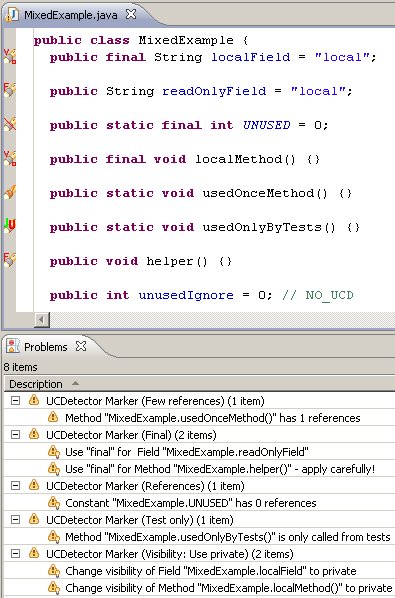
Change code, use QuickFixes!
After checking carefully all the possibilities above, maybe you decide to change your code. Click on the marker to see QuickFixes's to change code:- Delete code: When UCDetector tells you that there are no references
- Move code: When UCDetector tells you that there is only 1 reference (change UCDetector preference "Detect code with max number of references" to 1
- Change visibility: Use protected , default or private
- Use final
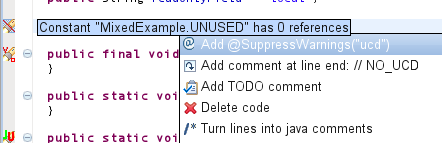
Ignore code
// NO_UCD
/**
 * Class is only used by reflection.
 * Write a // NO_UCD comment at the end of the line.
 * This line will be ignored by UCDetector.
 */
public class BeanExample { // NO_UCD
@SuppressWarnings("ucd")
/**
 * Class is only used by reflection.
 * Add a @SuppressWarnings("ucd") annotation.
 * This class/method/field will be ignored by UCDetector.
 */
@SuppressWarnings("ucd")
public class BeanExample {
@UsedBy("reflection")
I don't like this one, but users asked for it:If you want to "pollute" your code, you can use the
@org.ucdetector.util.UsedBy
annotation located inside ucdetector-annotations.jar which is inside org.ucdetector.source_x.y.z.zip.
/**
 * Class is only used by reflection.
 * Add a @SuppressWarnings("ucd") annotation.
 * This class/method/field will be ignored by UCDetector.
 */
@UsedBy("reflection")
public class BeanExample {
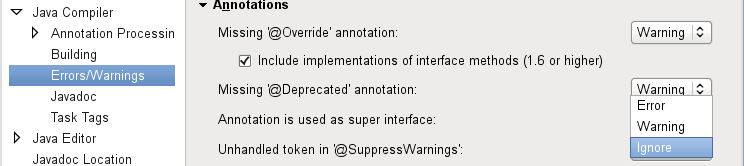
Set eclipse compiler setting "Unhandled token in '@SuppressWarnings'" to Ignore
To avoid eclipse Warnings "Unsupported @SuppressWarnings("ucd")"